
Top 25 Must-Have Gaming Accessories Every Gamer Needs in 2026

Gaming is more than just a hobby; it’s an experience. To truly enjoy your games and stay competitive, having the right accessories is key. Whether you’re a PC gamer, console enthusiast, or love retro gaming, the right gear can make all the difference. In 2026, the market is flooded with gaming gadgets online India, offering everything from RGB gaming products to high-performance gaming headsets. I’ve put together a list of the top 25 must-have gaming accessories that will upgrade your setup and boost your gameplay.
Why Gaming Accessories Matter
Gaming accessories do more than just look cool. They improve comfort, enhance performance, and create an immersive environment. A good gaming mouse or keyboard can give you faster response times. Quality gaming speakers or headsets bring the game’s sound to life. Even small things like a mouse pad or controller grips can make long sessions easier and more enjoyable.
If you want to build a gaming setup that stands out and performs well, investing in the right accessories is a smart move. Let’s dive into the essentials you should consider in 2026.

Top 25 Gaming Accessories You Need in 2026
1. Gaming Mouse
A gaming mouse is the heart of your setup. Look for one with adjustable DPI, programmable buttons, and ergonomic design. Wireless options offer freedom, but wired mice often have lower latency.
Pros:
Precise control
Customizable buttons
Comfortable for long use
Cons:
Wireless models need charging
Some can be pricey
2. Gaming Keyboard
Mechanical keyboards are popular for their tactile feedback and durability. RGB lighting adds style and helps you find keys in the dark.
Pros:
Fast response
Customizable lighting
Durable switches
Cons:
Can be noisy
Higher cost than membrane keyboards
3. Gaming Headset
Sound is crucial in gaming. A good headset delivers clear audio and a quality microphone for team chats. Look for comfort and surround sound features.
Pros:
Immersive sound
Clear communication
Comfortable fit
Cons:
Wired headsets can tangle
Wireless models need charging
4. Gaming Controller
For console gamers or PC users who prefer controllers, ergonomic design and responsive buttons are key. Some controllers offer customizable layouts.
Pros:
Comfortable grip
Customizable buttons
Compatible with many devices
Cons:
Battery life varies
Some games don’t support controllers well
5. Gaming Speakers
If you prefer speakers over headsets, choose ones with good bass and clear highs. Surround sound speakers create an immersive experience.
Pros:
Rich sound quality
No wearing discomfort
Great for group gaming
Cons:
Can disturb others
Requires space on desk
6. RGB Gaming Products
RGB lighting is more than just aesthetics. It can sync with your game or music, creating a dynamic atmosphere. RGB keyboards, mice, and even mouse pads are popular.
Pros:
Customizable lighting effects
Enhances gaming mood
Syncs with other RGB devices
Cons:
Uses extra power
Can be distracting if overdone
7. Mouse Pad with Wrist Support
A smooth mouse pad improves tracking, and wrist support reduces strain during long sessions.
Pros:
Better mouse control
Reduces wrist fatigue
Easy to clean
Cons:
Takes desk space
Some pads wear out over time
8. Gaming Chair
Comfort is key for long gaming hours. A good chair supports your back and neck, improving posture.
Pros:
Ergonomic support
Adjustable features
Durable materials
Cons:
Can be expensive
Takes up space
9. Monitor with High Refresh Rate
A monitor with 144Hz or higher refresh rate offers smoother gameplay. Look for low response time and good resolution.
Pros:
Smooth visuals
Reduces motion blur
Better for fast games
Cons:
Higher cost
Requires powerful GPU
10. External Hard Drive or SSD
Games take up a lot of space. An external drive helps store games and backups.
Pros:
Extra storage
Portable
Fast data transfer with SSD
Cons:
Additional cost
Can be bulky
11. Console Cooling Fan
For console gamers, overheating can be an issue. Cooling fans help keep your system running smoothly.
Pros:
Prevents overheating
Extends console life
Easy to install
Cons:
Adds noise
Extra power source needed
12. Controller Charging Dock
Keep your controllers charged and ready with a dedicated dock.
Pros:
Organizes controllers
Charges multiple devices
Saves desk space
Cons:
Extra accessory to buy
Needs power outlet
13. VR Headset
Virtual reality takes gaming to the next level. VR headsets offer immersive experiences in supported games.
Pros:
Immersive gameplay
Interactive experiences
Growing game library
Cons:
Expensive
Can cause motion sickness
14. Gaming Glasses
Reduce eye strain with gaming glasses that filter blue light.
Pros:
Protects eyes
Reduces fatigue
Improves focus
Cons:
May take time to get used to
Additional cost
15. Streaming Microphone
For gamers who stream, a quality microphone improves audio clarity.
Pros:
Clear voice capture
Reduces background noise
Professional sound quality
Cons:
Requires setup
Can be pricey
16. Cable Management Kit
Keep your setup tidy with cable clips, sleeves, and ties.
Pros:
Reduces clutter
Prevents cable damage
Improves aesthetics
Cons:
Extra effort to install
Some kits are costly
17. Gaming Desk
A desk designed for gaming offers space and features like headphone hooks and cup holders.
Pros:
Spacious surface
Built-in features
Sturdy design
Cons:
Takes room
Can be expensive
18. Joystick or Flight Stick
For flight simulators and certain games, a joystick offers better control.
Pros:
Precise control
Immersive experience
Customizable buttons
Cons:
Limited game compatibility
Takes desk space
19. Gaming Router
A router optimized for gaming reduces lag and improves connection stability.
Pros:
Low latency
Prioritizes gaming traffic
Better Wi-Fi coverage
Cons:
Higher price
Setup can be technical
20. Gaming Gloves
Gloves designed for gaming improve grip and reduce sweat.
Pros:
Better control
Comfortable fit
Protects hands
Cons:
Not for everyone
Can feel restrictive
21. Capture Card
For content creators, a capture card records gameplay in high quality.
Pros:
High-quality recording
Easy streaming
Compatible with consoles and PC
Cons:
Expensive
Requires setup
22. Gaming Backpack
Carry your gear safely with a backpack designed for gaming laptops and accessories.
Pros:
Organized storage
Protective padding
Comfortable to carry
Cons:
Extra cost
Bulky
23. Gaming Controller Grips
Add grips to your controller for better hold and comfort.
Pros:
Improved grip
Reduces slipping
Affordable
Cons:
May wear out
Some affect button feel
24. RGB Light Strips
Add ambient lighting to your gaming space with RGB light strips.
Pros:
Customizable colors
Enhances mood
Easy to install
Cons:
Uses power
Can be distracting
25. Gaming Console Skins
Protect and personalize your console with skins.
Pros:
Custom look
Protects from scratches
Easy to apply
Cons:
May leave residue
Limited durability
Buying Guide for Gaming Accessories
Choosing the right gaming accessories depends on your setup, budget, and gaming style. Here are some tips to help you pick the best gear.
Know Your Gaming Platform
PC gamers have different needs than console players. For example, a gaming mouse and keyboard are essential for PC, while controllers and charging docks matter more for console users.
Prioritize Comfort
Long gaming sessions demand comfortable gear. Look for ergonomic designs in chairs, mice, and headsets.
Check Compatibility
Make sure accessories work with your devices. Some controllers or headsets may not support all consoles or PCs.
Look for Customization
Many gaming accessories offer programmable buttons and RGB lighting. Customization lets you tailor your setup to your preferences.
Set a Budget
Gaming accessories range from affordable to premium. Decide what features matter most and find options within your budget.
Read Reviews
User reviews and expert opinions can reveal real-world performance and durability.
Comparison Table of Popular Gaming Accessories
| Accessory | Key Features | Price Range (INR) | Best For | Example Product |
|---------------------|---------------------------------|-------------------|--------------------------|----------------------------------------|
| Gaming Mouse | Adjustable DPI, programmable buttons | 1500 - 8000 | PC gamers | Logitech G502 Hero |
| Gaming Keyboard | Mechanical switches, RGB lighting | 3000 - 12000 | PC gamers | Corsair K70 RGB |
| Gaming Headset | Surround sound, noise-cancelling mic | 2000 - 10000 | All platforms | HyperX Cloud II |
| Gaming Controller | Ergonomic, customizable buttons | 2500 - 7000 | Console & PC | Xbox Wireless Controller |
| Gaming Speakers | Surround sound, bass boost | 3000 - 15000 | Group gaming | Logitech Z623 |
| RGB Light Strips | Customizable colors, sync options | 1000 - 4000 | Ambience setup | Philips Hue Lightstrip |
Featured Products from GamerHouse.in
When shopping for gaming accessories, I often check out GamerHouse.in. They offer a wide range of gaming setup accessories, especially for gamers in India looking for quality and variety.
One standout product is the Logitech G502 Hero Gaming Mouse. It offers precise tracking, customizable buttons, and RGB lighting. It’s perfect for PC gamers who want accuracy and style.
Another great pick is the Corsair K70 RGB Mechanical Keyboard. It combines durability with vibrant RGB lighting and fast response keys. This keyboard is a favorite for competitive gamers.
For audio, the HyperX Cloud II Gaming Headset delivers clear sound and comfort. It’s compatible with multiple platforms and has a noise-cancelling mic for team chats.
These products show how you can build a powerful gaming setup with accessories that enhance your experience without breaking the bank.

FAQs About Gaming Accessories
Q1: Are RGB gaming products worth it?
RGB lighting adds style and can improve immersion. It’s not essential but enhances the gaming atmosphere.
Q2: How do I choose the best gaming headset?
Look for comfort, sound quality, and a good microphone. Wireless headsets offer freedom but check battery life.
Q3: Can I use a gaming controller on PC?
Yes, many controllers are compatible with PC. Check for drivers or Bluetooth support.
Q4: What is the best way to reduce lag in online games?
Use a gaming router or wired Ethernet connection to improve stability and reduce latency.
Q5: Where can I buy gaming gadgets online India?
GamerHouse.in is a reliable store with a wide selection of gaming accessories.
Final Thoughts on Gaming Accessories in 2026
Upgrading your gaming setup with the right accessories can transform your experience. From a responsive gaming mouse to immersive headsets and vibrant RGB products, each piece adds value. Whether you’re building a new setup or enhancing an old one, focus on comfort, compatibility, and quality.
Remember, the best gaming accessories fit your style and needs. Explore options, read reviews, and don’t hesitate to invest in gear that makes gaming more fun and competitive. For gamers in India, GamerHouse.in is a great place to find everything you need to level up your setup.
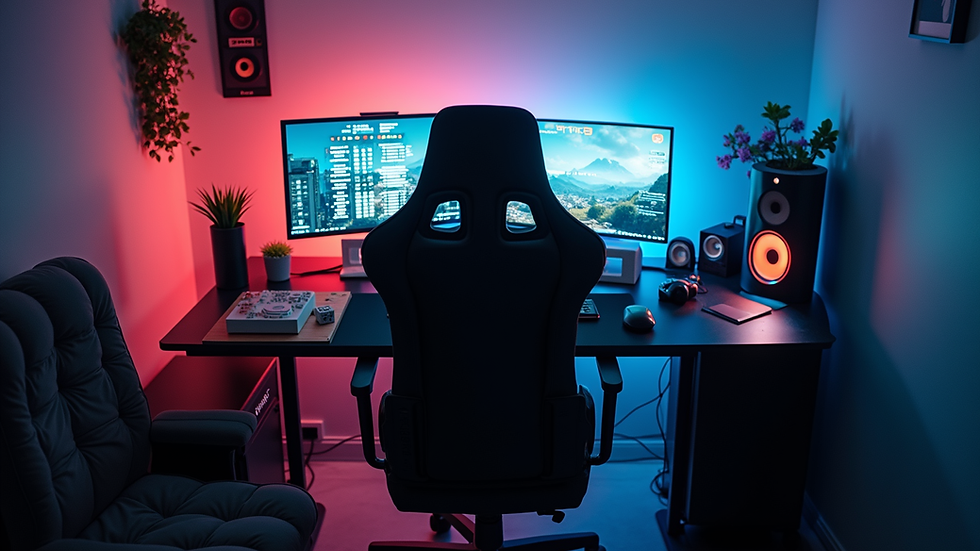
Get ready to game like never before in 2026 with these must-have accessories!


Comments